

Set your Cache Rules
In the Cache Rules section, you can define how your CDN caches and delivers content. This allows you to control caching behavior, including which content to cache, how long to cache it for, and whether to ignore specific cache settings from the origin server or client.1. General Info
The General Info section allows you to set the basic parameters for your cache rule.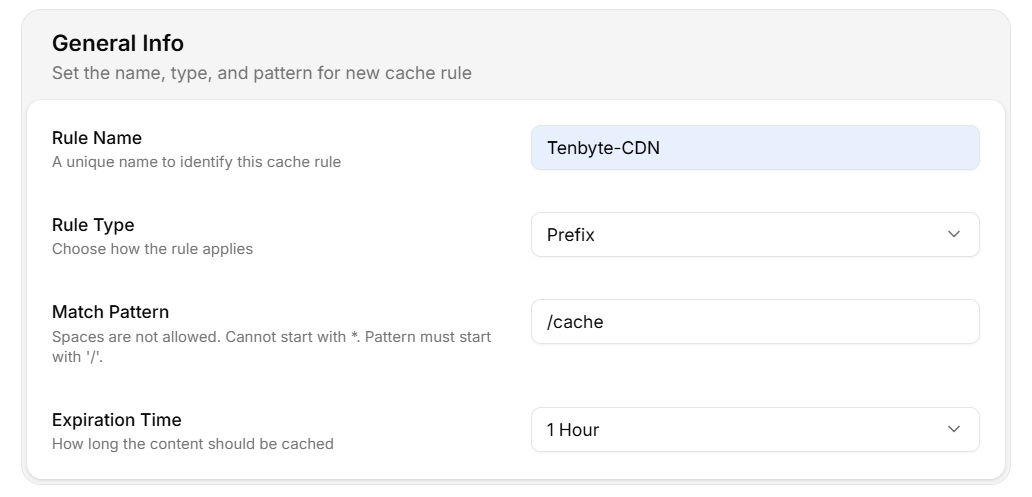
General Info
- Rule Name: Provide a unique name for your cache rule to easily identify it.
- Rule Type: Select how the rule applies:
- Prefix: Applies to URLs that begin with a specific string.
- Regex: Applies to a pattern matching multiple URLs based on a regular expression.
- Match Pattern: Define the URL pattern for the cache rule. The pattern must start with
/and cannot contain spaces or*. - Expiration Time: Set how long the content should be cached.
2. Rule Configurations
-
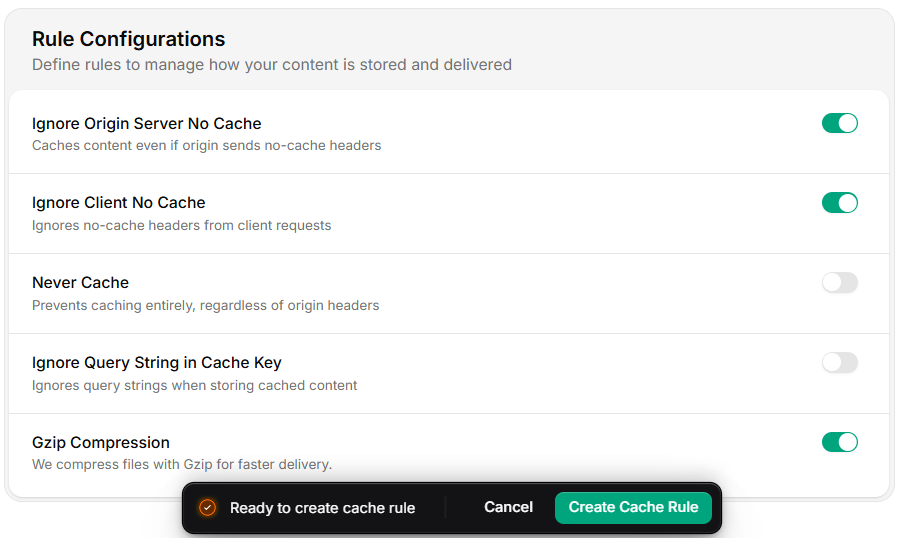
You can further configure how your content is stored and delivered.
Rule Configurations
- Ignore Origin Server No Cache: Enable this setting to cache content even if the origin server sends no-cache headers.
- Ignore Client No Cache: Enable this option to ignore no-cache headers from client requests, allowing content to be cached regardless of client-side instructions.
- Never Cache: Prevents caching entirely, regardless of the origin headers. This setting ensures that content is never cached by the CDN.
- Ignore Query String in Cache Key: Enable this setting to ignore query strings when storing cached content.
- Gzip Compression: Enable Gzip Compression to compress files for faster delivery. This is beneficial for text-based content, such as HTML, CSS, and JavaScript files.